
Patch Every Windows PC. Automatically. At Scale.
JetPatch gives IT teams complete control over Windows endpoint patching — laptops, desktops, and remote devices — with built-in WSUS integration, WSUS-less cloud delivery, 3rd-party software updates, and pre-deployment readiness checks that ensure patches succeed the first time.
Windows Endpoints Are Hard to Keep Patched.
Between remote workers, Intune-managed devices, bandwidth constraints, and 3rd-party software sprawl, keeping every Windows PC compliant is a constant battle. Most organizations discover the gaps only when an audit fails or an incident strikes.
The shift to hybrid work has made this problem significantly worse. When most endpoints were on the corporate network, WSUS could reach them reliably during scheduled maintenance windows. Now, a substantial percentage of the Windows fleet is remote — laptops connecting from home networks, hotel Wi-Fi, and mobile hotspots. These devices miss WSUS sync cycles, accumulate patch debt, and become the most vulnerable endpoints in the organization. The devices most likely to be compromised are the ones least likely to be patched.
Meanwhile, the attack surface extends beyond Microsoft patches. Users install Chrome, Adobe, Java, Zoom, and dozens of other applications that WSUS doesn't cover. Each unpatched third-party application is a potential entry point. And when auditors ask for proof that every endpoint is compliant, IT teams spend hours pulling data from WSUS consoles, spreadsheets, and multiple vendor dashboards — a manual process that is both time-consuming and error-prone. JetPatch consolidates all of this into one console with one workflow and one compliance report.
Remote & off-network PCs
Laptops that rarely touch the corporate network miss patch cycles entirely — leaving remote workers as your most vulnerable endpoints.
3rd-party software gaps
WSUS handles Microsoft updates, but Chrome, Adobe, Java, and dozens of other apps need patching too — and most tools don't cover them.
Failed patches & rework
Without pre-deployment readiness checks, patches fail silently. Teams spend hours chasing WUA errors, stuck sync states, and unreported endpoints.
Proving compliance
Auditors need reports by device, by patch, and by severity. Pulling that data manually from WSUS and spreadsheets is time-consuming and error-prone.
Two Ways to Patch Windows Endpoints
Whether your organization runs WSUS on-premises or needs a cloud-native approach for remote workers, JetPatch has you covered — same console, same governance, same compliance reporting.
Deep integration with your existing Windows Server Update Services infrastructure. Patches approved, managed, and deployed centrally with full bandwidth optimization.
No WSUS server required. Endpoints pull approved patches directly from Microsoft Update — ideal for remote workers and cloud-first organizations.
How JetPatch Endpoint Readiness eliminates patch failures
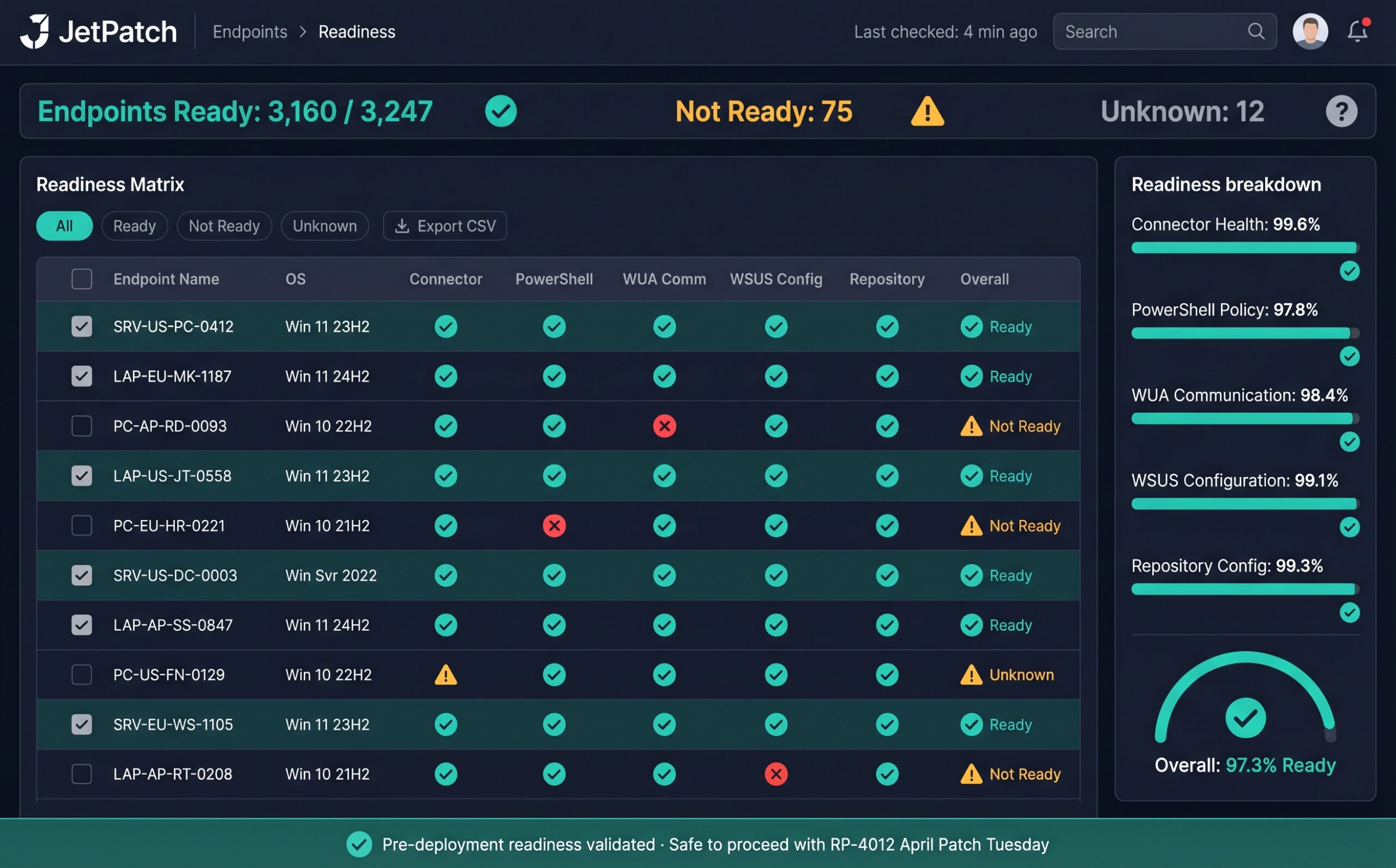
The most common reason Windows patches fail is not the patch itself — it is the endpoint not being ready to receive it. A laptop that hasn't communicated with WSUS in 48 hours, a PC with a broken Windows Update Agent, a server with a misconfigured PowerShell execution policy, or a device whose connector has gone offline will all fail silently when a patch cycle runs. IT teams discover these failures hours or days later, then spend significant time diagnosing and remediating each endpoint individually.
JetPatch's Endpoint Readiness feature eliminates this cycle by validating every endpoint before any patch deployment begins. The system checks WUA communication status, WSUS server connectivity, PowerShell execution policy, connector health, and repository configuration for each endpoint. Endpoints that pass all checks are marked as Ready. Those that fail are flagged with the specific criterion that needs attention — giving IT teams a clear, actionable list of issues to resolve before the maintenance window opens.
This pre-flight validation is what drives JetPatch's 95% first-attempt patch success rate. Instead of deploying patches and hoping they stick, IT teams deploy patches knowing they will succeed — because every endpoint has been verified as ready to receive them. The Readiness dashboard provides a real-time view of fleet readiness status, with the ability to filter by Ready, Not Ready, and Unknown states, and drill down into individual endpoint criteria to see exactly what needs fixing.
For organizations running both WSUS and WSUS-Less modes, Endpoint Readiness adapts automatically. WSUS-connected endpoints are validated against WSUS server communication and group membership. WSUS-Less endpoints are validated against Microsoft Update connectivity and connector health. Both modes use the same readiness criteria framework and the same dashboard — giving IT teams a unified readiness view regardless of delivery method.
Discover. Assess. Patch. Report.
JetPatch handles the complete Windows endpoint patching lifecycle — from discovery and readiness validation through deployment and compliance reporting. Each stage is governed by policy, integrated with your ITSM workflow, and fully auditable. The entire process runs within defined maintenance windows to protect end-user productivity, and every action is logged for compliance evidence.
Discover
JetPatch discovers every Windows endpoint via WSUS, Active Directory, and direct connector deployment — including Intune-managed and non-domain-joined devices.
Assess
Endpoint Readiness validates WUA communication, PowerShell policy, WSUS connectivity, and connector health — so you know your success rate before any patch cycle runs.
Patch
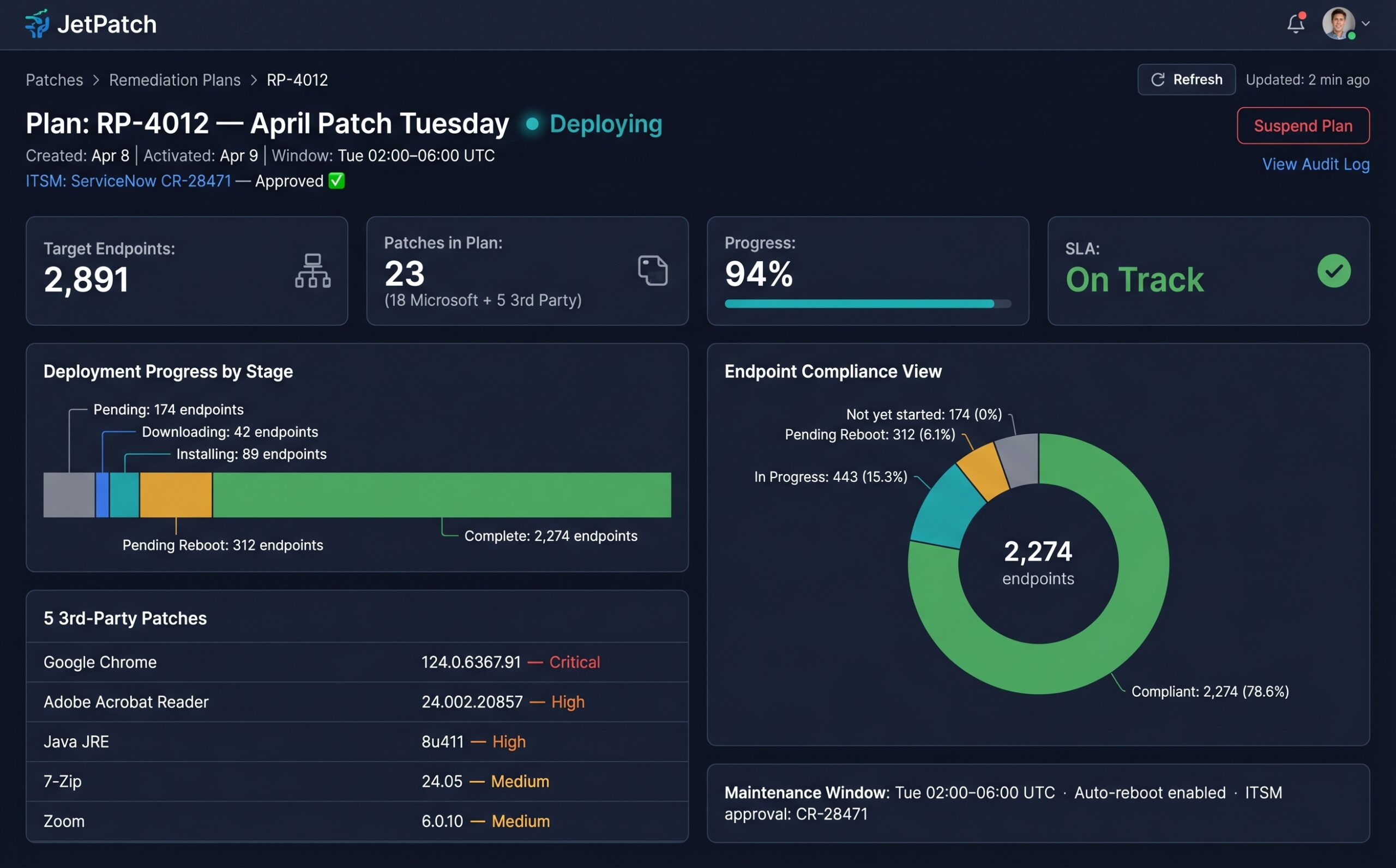
Remediation Plans deploy Microsoft and 3rd-party patches during defined maintenance windows — with ITSM approval workflows and automatic reboot management.
Report
Audit-ready reports on demand: missing patches per endpoint, security patches by category, compliance by plan, and SLA summaries — in CSV and PDF.
Real Results for Windows IT Teams
Everything You Need to Manage Windows Endpoints.
Built specifically for enterprise Windows environments — from the office to the home office. Every capability KC-verified and production-proven.
Endpoint Discovery & Inventory
Automatically identify every Windows PC via WSUS, Active Directory, and direct connector deployment. Every device accounted for — including previously unmanaged assets.
Endpoint Readiness Checks
Before any patch cycle, JetPatch validates each endpoint's WUA status, WSUS communication, PowerShell policy, and connector health. Know your expected success rate before you deploy.
Maintenance Windows
Define recurring maintenance schedules and assign endpoints to them. Patches only deploy during approved windows — protecting end-user productivity and business operations.
Smart Groups & Tagging
Organize endpoints with dynamic Smart Groups and custom tags — by department, location, or risk level. Target the right patches to the right devices, every time.
Automatic Remediation Rules
Rules that automatically create and activate remediation plans — keeping your Windows fleet continuously patched without manual intervention every cycle.
Compliance Reporting
Audit-ready reports on demand: endpoints with missing patches, security patches by category, compliance by remediation plan, and SLA summaries — CSV and PDF.
ITSM Integration
Remediation Plans integrate with ServiceNow and Jira for change request workflows. Patches only deploy after ITSM approval — full audit trail included.
Vulnerability Scanner Integration
Connect with Tenable, Qualys, Rapid7, and Nodeware. Create remediation plans directly from scan results — bridge the gap between finding vulnerabilities and fixing them.
Patch Beyond Windows Update
WSUS handles Microsoft patches — but your users run dozens of other applications. JetPatch's built-in catalog patches popular Windows apps through the same workflow, at no extra cost.
Available in WSUS-based mode. Delivered through the JetPatch Catalog at no additional cost.
What Does Your Patch Readiness Look Like?
Drag the slider to simulate your fleet's readiness level. See what JetPatch surfaces before you deploy — and what you'd miss without it.
This is a simulation for illustration purposes. The actual JetPatch platform surfaces real endpoint readiness data from your environment with specific device names, exact failure criteria, and actionable remediation steps.
See Windows Endpoint Management in Action
Get a walkthrough of JetPatch managing your Windows fleet — WSUS integration, readiness checks, and compliance reporting — in under 30 minutes.
Trusted by Enterprise IT Teams
"Best software for endpoints. It saves lots of manual effort keeping devices up to date. When it comes to eliminating cyber gaps, there is no match."
"JetPatch provided a real WOW factor as it innovated our entire vulnerability and patch remediation process. We met required compliance, minimized downtime, and significantly reduced risk exposure."
"Great unified patch management solution. It helped us onboard patching for Windows through a single platform with real cost optimization across our entire environment."
Endpoint Management Is One Part of the Platform. Here's the Rest.
Windows Endpoint Patching — Technical Details
What is Windows endpoint patch management?
Windows endpoint patch management is the automated process of discovering, assessing, deploying, and reporting on security patches and software updates across all Windows PCs, laptops, and devices in an organization. It covers Microsoft patches delivered through WSUS as well as third-party application updates for software like Chrome, Adobe, Java, and Zoom.
What is WSUS-less patching?
WSUS-less patching allows Windows endpoints to pull approved patches directly from Microsoft Update without requiring an on-premises WSUS server. JetPatch supports WSUS-less mode from version 4.2.8 onward, making it ideal for remote workers and cloud-first organizations that want full patch governance without WSUS infrastructure.
What is Endpoint Readiness in JetPatch?
Endpoint Readiness is a pre-deployment validation feature that checks each Windows endpoint before any patch cycle runs. It validates WUA communication with WSUS, PowerShell execution policy, connector health, and repository configuration. This ensures you know your expected success rate before deploying patches — which is why JetPatch achieves a 95% first-attempt patch success rate.
Does JetPatch support 3rd-party software patching on Windows?
Yes. JetPatch includes a built-in 3rd-party software catalog at no extra cost that covers 50+ popular Windows applications including Google Chrome, Mozilla Firefox, Adobe Acrobat Reader, Java, 7-Zip, Zoom, and more. Third-party patches are delivered through the same WSUS infrastructure and workflow as Microsoft patches.
Can JetPatch patch remote and off-network Windows devices?
Yes. JetPatch supports both WSUS-based patching for on-premises and domain-joined devices, and WSUS-less patching for remote and off-network devices that pull patches directly from Microsoft Update. Both modes use the same governance, scheduling, maintenance windows, and compliance reporting from one console.
Patch Every Windows PC. Prove It to the Auditors.
Talk to our team — get a tailored walkthrough of JetPatch endpoint management in your environment in under 30 minutes.