
One Console for Every Server Tool Agent in Your Environment
Stop managing agents one server at a time. JetPatch Agent Manager gives IT teams centralized, policy-driven control over 50+ tool agents — Splunk, InsightVM, Zabbix, CrowdStrike, and more — across physical, virtual, and cloud infrastructure from a single console.
Deployed for over a decade at a Forbes #1 ranked global management consulting firm — a recognized market leader in IT strategy and digital transformation, consistently ranked in the top 10 for prestige by Vault.
Enterprise-grade reliability proven at scale across one of the world's most demanding IT environments.
Your Servers Run Dozens of Agents. Nobody Manages Them.
Enterprise servers typically run 8–15 software agents — monitoring, security, backup, performance, compliance. Each one needs to be installed, configured, updated, and troubleshot individually. Across thousands of servers, that's tens of thousands of agent instances with no central visibility, no policy enforcement, and no automated remediation.
The agent sprawl problem has grown worse as enterprises adopt hybrid and multi-cloud infrastructure. A server running in AWS needs the same Splunk forwarder, the same vulnerability scanner, and the same backup agent as its counterpart in the on-premises data center — but the deployment paths are different, the configurations vary by environment, and the update cycles don't align. IT operations teams spend significant time on agent-related tasks: deploying new agents, upgrading existing ones, troubleshooting silent failures, resolving configuration conflicts, and proving compliance to auditors who need evidence that every required agent is running on every required server.
This is the gap JetPatch Agent Manager fills. It provides a single operational layer that sits between your server tool vendors and your endpoint infrastructure — giving IT teams the centralized control they need to deploy, configure, monitor, and maintain every agent on every server from one console, regardless of vendor, platform, or hosting environment. The result is faster deployments, lower operational cost, and a compliance posture that auditors can verify with a single report.
Every Tool Agent, Containerized
and Centrally Managed.
JetPatch Agent Manager virtualizes each server tool into a managed agent using our proprietary VAI (Virtual Agent Image) format — an isolated container with its own virtual registry, file system, and monitoring modules. The result: complete lifecycle control from a single console.
How VAI containerization protects your servers
Each software management tool that runs on your endpoints is compressed into a single managed agent in the form of a VAI file — a proprietary JetPatch format containing the agent payload along with configuration details and monitoring modules. VAI containers are isolated from the host operating system, with their own virtual registry, file system, and virtual resources. This means one agent cannot affect another, and a misbehaving agent cannot compromise the underlying server.
Even if the JetPatch Agent Manager itself experiences a failure, already-running managed agents continue to operate normally — the architecture is designed for fault tolerance at every layer. Once a VAI is installed on the Agent Manager Console, you can centrally deploy it to any number of endpoints, configure it according to your organizational policies, and subsequently manage it through its entire lifecycle.
Organizations can obtain managed agents through JetPatch professional services, or create their own using the JetPatch Self-Packager — a tool that lets customers build custom VAI files for any server-to-endpoint management product their environment requires.
The management service layer adds another dimension of control. For each managed agent, you create one or more management services that specify the agent type along with a set of relevant configuration options. These services are then associated with smart groups — dynamic collections of endpoints defined by filters such as operating system, location, department, or custom tags. When a new server matches a smart group's filter criteria, the appropriate management services are automatically provisioned to it. When a server no longer matches, the services stop being applied. This policy-driven approach eliminates the manual overhead of tracking which agents should run where, and ensures that your agent deployment always reflects your current organizational structure and security requirements.
For organizations running JetPatch Patch Management alongside Agent Manager, the integration is seamless. Patch Management handles operating system and third-party software updates, while Agent Manager handles the tool agent lifecycle. Both modules share the same console, the same endpoint inventory, and the same policy framework — giving IT teams a unified operational platform for everything that runs on their servers.
Everything You Need to Manage
Server Tool Agents at Scale.
Discovery & Inventory
Automatically discover every agent and server in your environment. Get a complete inventory of what's running where — across physical, virtual, and cloud infrastructure — with no manual auditing.
Policy-Driven Automation
Define include/exclude rules tied to smart groups. JetPatch automatically provisions the right agents to the right servers — and when policy drifts occur, auto-remediation brings them back into compliance without manual intervention.
Deep Visibility & Diagnostics
Real-time centralized view of all deployed agents. See agent status, configuration state, resource consumption, and log files for every managed agent on every endpoint — from a single console.
Auto-Fix & Reconfigure
When an agent crashes, drifts from configuration, or stops reporting, JetPatch detects the issue and automatically re-deploys, reconfigures, or restarts it. No ticket, no manual SSH session, no delay.
Rapid Deployment & Upgrades
Deploy new agents to thousands of servers in minutes instead of weeks. Start, stop, or throttle any tool agent with a single action. Upgrade agent versions fleet-wide with zero-touch automation.
Resource Throttling & Control
Control CPU and memory consumption per managed agent. Prevent resource conflicts between tools, and ensure agents never impact the performance of the servers they run on.
Self-Packager
Need to manage a tool agent we don't support out of the box? Build your own custom VAI files with the JetPatch Self-Packager, or work with JetPatch professional services to have one created for you.
Compliance Dashboard
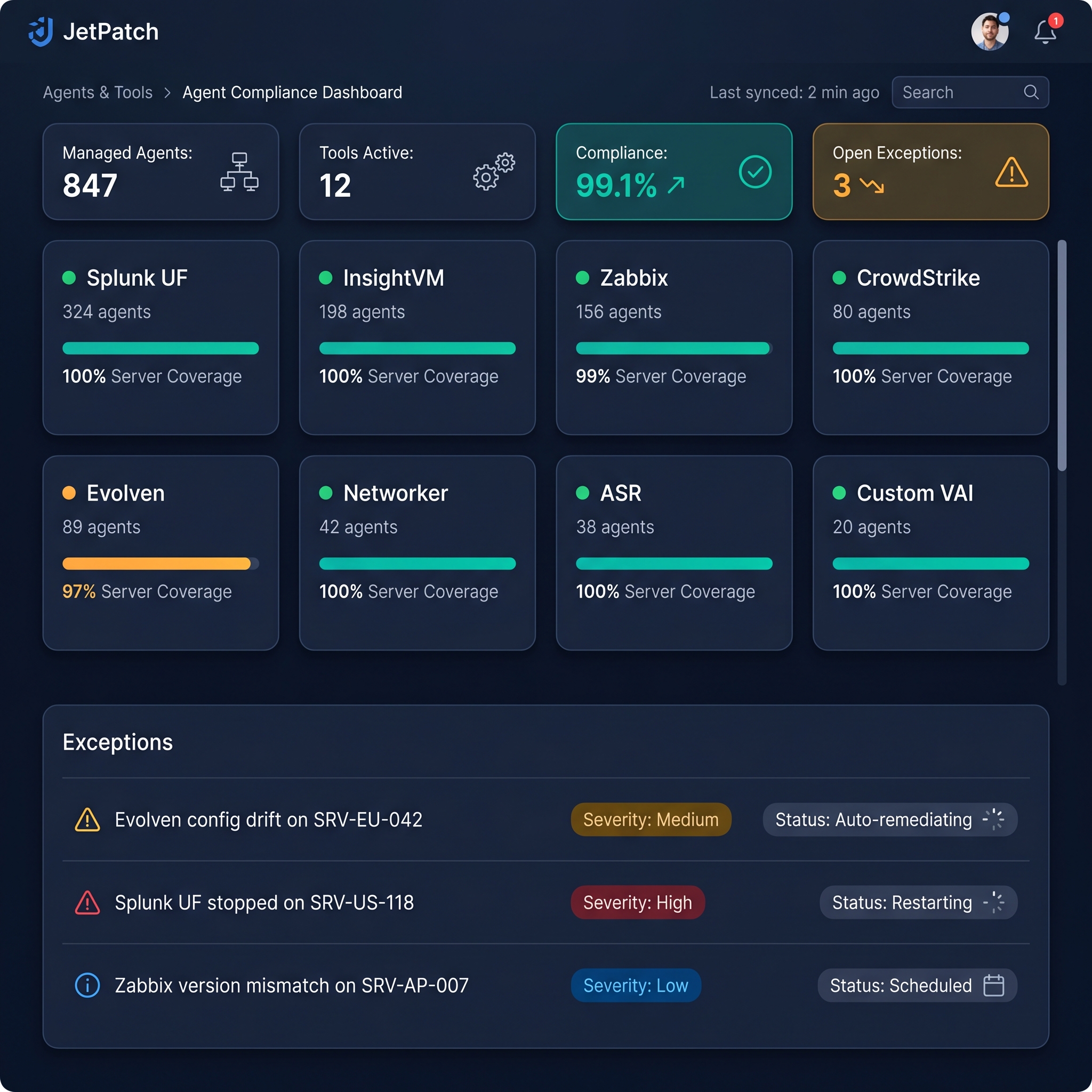
A comprehensive overview of server status and agent status across your environment. See open exceptions by severity, tool installation details, and exportable compliance reports — all in one view.
Why managing server tool agents manually doesn't scale
In a typical enterprise, each server runs multiple software agents from different vendors — a monitoring agent from Splunk, a vulnerability scanner from Rapid7, a backup agent from Dell EMC Networker, a security agent from CrowdStrike, and others. Each of these agents has its own installation process, its own configuration format, its own update cadence, and its own failure modes. When you multiply that across hundreds or thousands of servers spanning physical data centers, virtual environments, and multiple cloud providers, the result is an operational burden that consumes IT staff time and creates constant risk of configuration drift.
Without centralized agent management, organizations face three recurring problems. First, visibility gaps: agents crash silently, stop reporting, or fall out of compliance without anyone noticing until an audit or incident reveals the exposure. Second, deployment delays: rolling out a new agent or upgrading an existing one across a large fleet takes weeks of manual effort, creating windows where servers are inconsistently protected. Third, resource conflicts: agents from different vendors compete for CPU, memory, and network resources, degrading server performance and sometimes causing outages that are difficult to diagnose because no single tool has visibility across all the agents running on a given endpoint.
JetPatch Agent Manager solves these problems by treating every server tool agent as a managed, containerized workload. The VAI containerization model isolates each agent from the operating system and from other agents, eliminating resource conflicts and ensuring that one agent's failure cannot cascade to affect others. The policy engine continuously monitors agent state against defined rules and automatically remediates drift, so compliance is maintained without manual intervention. And the central console provides real-time visibility into every managed agent on every server — giving IT teams the single pane of glass that vendor-specific management tools cannot provide. Whether you are managing four tool agents across fifty servers or fifteen agents across five thousand servers, the operational model scales without adding headcount or complexity.
What Happens When an Agent Fails?
Select a scenario below to see how JetPatch Agent Manager responds automatically — no tickets, no SSH sessions, no manual intervention.
Works with 50+ Agent Platforms
Pre-built support for leading server tools, plus the Self-Packager for any agent your environment requires.
See Agent Manager in Your Environment
Get a walkthrough showing how JetPatch manages your specific tool agents — in under 30 minutes.
Agent Management Is One Part of the Platform. Here's the Rest.
Server Agent Management — Technical Details
What is server agent management?
Server agent management is the practice of centrally deploying, configuring, monitoring, and maintaining the software tool agents that run on enterprise servers — such as monitoring agents, security agents, backup agents, and performance agents. Without a management layer, IT teams must manually install, update, and troubleshoot each agent on every server individually.
How many tool agents does JetPatch support?
JetPatch Agent Manager supports 50+ server tool agents out of the box, including Splunk, InsightVM, Zabbix, Evolven, and many others. Organizations can also create custom managed agents using the JetPatch Self-Packager tool, extending support to virtually any server-to-endpoint management product.
What is the JetPatch VAI format?
VAI (Virtual Agent Image) is a proprietary JetPatch format that containerizes each server tool agent into an isolated package containing the agent payload, configuration details, and JetPatch monitoring modules. VAI containers have their own virtual registry and file system, isolating them from the host operating system so one agent cannot affect another or the underlying server.
Can JetPatch automatically fix agent compliance issues?
Yes. JetPatch Agent Manager includes a policy engine with auto-remediation. When an endpoint's managed agents do not match the configured policy, JetPatch flags the compliance exception and — if auto-remediation is enabled — automatically redeploys the correct agent configuration without manual intervention.
Does JetPatch Agent Manager work in cloud, virtual, and physical environments?
Yes. JetPatch Agent Manager supports physical servers, virtual machines, and cloud instances across Windows and Linux environments. It provides a single console for managing tool agents regardless of where the servers are hosted — on-premises, in private clouds, or across public cloud providers.
Take Control of Every Agent on Every Server.
Talk to our team — get a tailored walkthrough of JetPatch Agent Manager in your environment in under 30 minutes.