
Windows Server Patching: Keep WSUS or Replace It.
WSUS is deprecated — and you decide what comes next. JetPatch integrates deeply with your existing WSUS, or replaces it with the JetPatch repository, including fully air-gapped servers. Pre-deployment readiness checks ensure patches succeed the first time, from one console that also patches Linux, AIX and Solaris.
Patch Tuesday Shouldn't Be a Fire Drill.
Every month, Microsoft releases patches. Every month, IT teams scramble to deploy them across servers, endpoints, and remote devices — often discovering failures days later. The tools that promise to help either replace your entire WSUS infrastructure or deliver patches without telling you whether they'll succeed.
Cloud-native tools like NinjaOne require you to abandon WSUS entirely — replacing an infrastructure your organization has already invested in, your team already knows, and your compliance policies are already built around. Enterprise tools like Ivanti offer risk-based intelligence but at high complexity and cost, with no WSUS integration. Budget-friendly options like ManageEngine offer broad 3rd-party coverage but users report "slow remote device patching," "outdated UI," and patches that "fail to install or show generic error messages."
None of them answer the fundamental question every IT team asks before pushing patches: "Will this actually work on every endpoint?" JetPatch does — with pre-deployment readiness validation that checks every endpoint before every cycle.
Patch Tuesday chaos
Dozens of patches, thousands of endpoints, one maintenance window. Manual coordination is slow, error-prone, and doesn't scale.
Remote devices drift
Laptops on home Wi-Fi miss WSUS sync cycles. They accumulate patch debt silently — becoming your most vulnerable endpoints.
3rd-party blind spots
WSUS handles Microsoft patches. But Chrome, Adobe, Java, Zoom, and dozens of other apps need patching too — and WSUS alone doesn't cover them.
Silent failures
WUA communication timeouts, broken PowerShell policies, and misconfigured WSUS settings cause patches to fail silently. You discover it days later.
Two Delivery Modes. One Console. Full Governance.
NinjaOne and Ivanti require you to replace WSUS. JetPatch is the only platform that works deeply with your existing WSUS AND offers a WSUS-Less cloud option — from the same console, with the same compliance reporting.
Deep integration with your existing Windows Server Update Services. Patches approved, managed, and deployed centrally — with full bandwidth optimization and replica support.
No WSUS server required. Endpoints pull approved patches directly from Microsoft Update — ideal for remote workers and cloud-first organizations.
Know It Will Work Before You Push the Button.
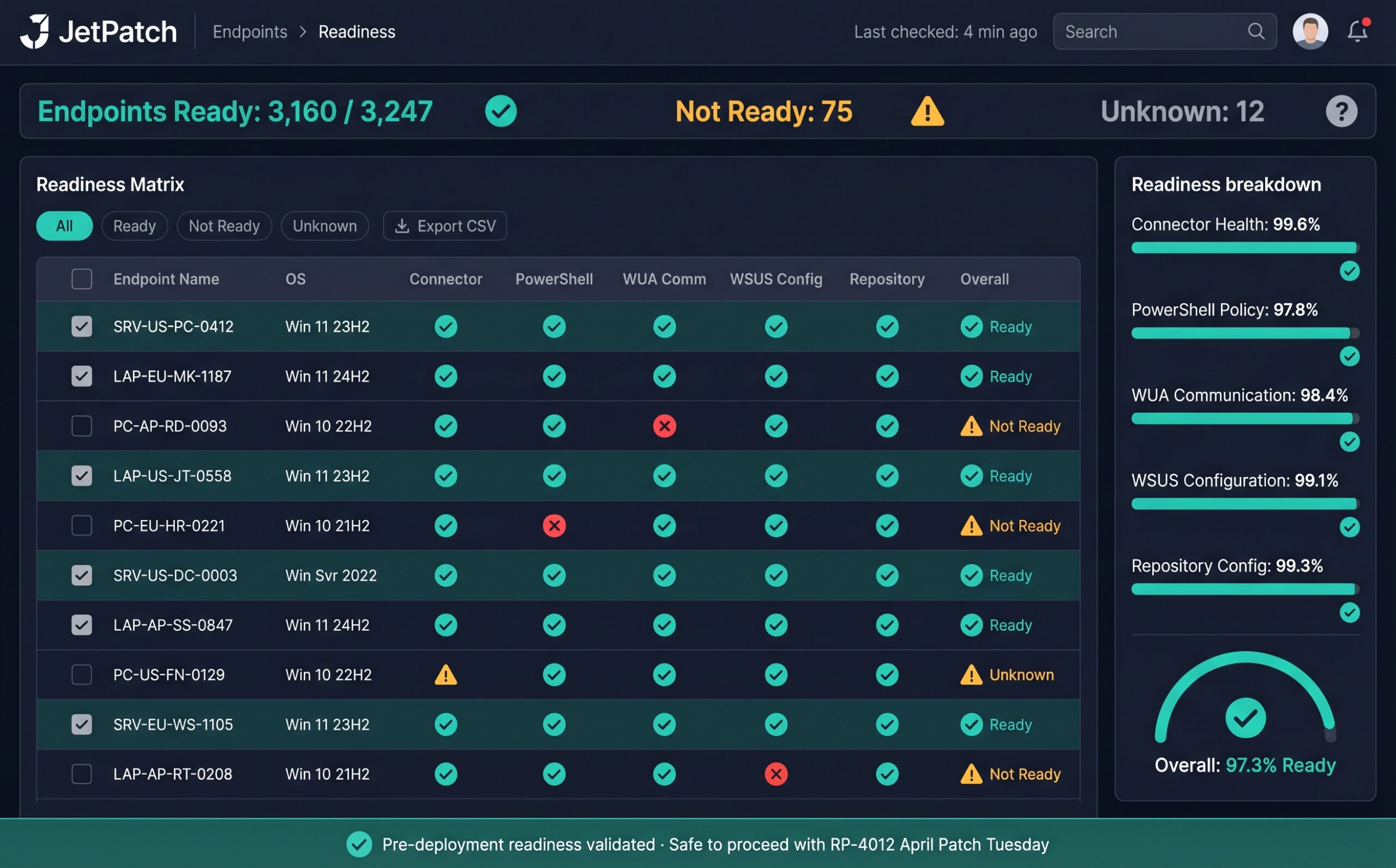
Every competitor deploys patches and hopes they succeed. JetPatch validates every endpoint before every cycle. Endpoint Readiness checks five criteria on each Windows device — if any fail, you see the specific issue and remediation steps before the maintenance window opens.
Each endpoint is classified as Ready, Not Ready, or Unknown. Not Ready endpoints show the specific criterion that failed with actionable remediation steps. Exemptions are automatically raised for endpoints with WSUS communication problems or connector issues — preventing them from entering a patch cycle until the underlying issue is resolved.
This is what drives JetPatch's 95% first-attempt patch success rate. You're not deploying and hoping — you're deploying with certainty. And for organizations running both WSUS and WSUS-Less modes, Readiness adapts automatically: WSUS-connected endpoints validate against WSUS server communication, while WSUS-Less endpoints validate against Microsoft Update connectivity.
Which Windows Patching Mode Is Right for You?
Answer four quick questions about your environment. We'll recommend the optimal JetPatch configuration for your infrastructure.
This is an interactive guide for illustration purposes. Contact JetPatch for a detailed architecture recommendation for your environment.
Patch Chrome, Adobe, Java, and 50+ More — Through Your WSUS.
JetPatch's proprietary 3rd-party catalog delivers application patches through your existing WSUS pipeline — same workflow, same approval process, same compliance reporting. Included with End User Device licensing or available as a standalone purchase.
Available in WSUS-based mode. Custom applications can be added to the catalog upon request.
Supported Windows Versions
See Windows Patching With JetPatch
Get a walkthrough of WSUS integration, Endpoint Readiness, and the 3rd-party catalog in your environment.
Windows Patching — Technical Details
Can JetPatch work with my existing WSUS infrastructure?
Yes. JetPatch provides deep integration with Windows Server Update Services including primary and replica WSUS servers, bidirectional group synchronization, bandwidth optimization via Delivery Optimization, and full 3rd-party software patching through the WSUS pipeline. JetPatch enhances your existing WSUS investment rather than replacing it.
What is WSUS-Less patching and how does it work?
WSUS-Less patching allows Windows endpoints to pull approved patches directly from Microsoft Update without requiring an on-premises WSUS server. Available from JetPatch version 4.2.8 onward, it is ideal for remote workers and cloud-first organizations. JetPatch retains full governance, scheduling, maintenance windows, and compliance reporting in WSUS-Less mode. Note that 3rd-party patching requires WSUS-based mode.
How does JetPatch achieve a 95% first-attempt patch success rate?
JetPatch validates every Windows endpoint before each patch cycle through Endpoint Readiness checks. The system verifies WUA communication with WSUS, PowerShell execution policy, WSUS server connectivity, connector health, and repository configuration. Endpoints that fail any criterion are flagged with specific remediation steps before deployment begins.
Does JetPatch support 3rd-party Windows application patching?
Yes. JetPatch includes a proprietary 3rd-party software catalog covering 50+ popular Windows applications including Chrome, Firefox, Adobe, Java, 7-Zip, Zoom, and more. Patches are delivered through your existing WSUS infrastructure using the same workflow as Microsoft patches. The catalog is included with End User Device licensing or available as a standalone purchase. Custom applications can be added to the catalog upon request.
Can JetPatch patch Windows servers and endpoints from the same console used for Linux and Unix?
Yes. JetPatch patches Windows, Linux (RHEL, Ubuntu, SUSE, Debian, Rocky, Alma, CentOS, Amazon Linux), and Unix (Oracle Solaris, IBM AIX) from a single console with unified governance, reporting, and compliance.
Also Patch From the Same Console
Keep WSUS or Replace It — On Your Terms.
Talk to our team about your Windows Server patching. We'll show you how JetPatch works with your WSUS today — or replaces it with the JetPatch repository — and delivers patches with 95% first-attempt success.