
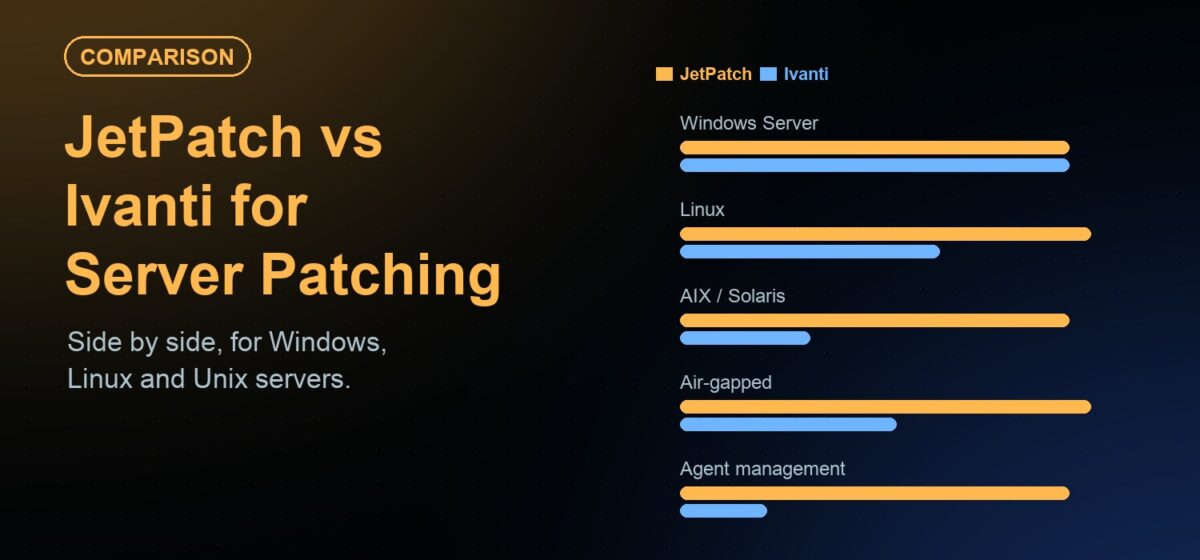
Short answer: Ivanti Security Controls is a strong fit for on-premises patching of Windows servers and mainstream Linux, and Ivanti Neurons for Patch Management suits teams that want a cloud-native tool with risk-based prioritization. JetPatch fits better when one on-prem console must patch Windows Server, eight Linux distributions, IBM AIX and Oracle Solaris together, and when you want to keep WSUS or replace it on your own schedule. If AIX, Solaris or SUSE servers are in scope, check them first, because they are not listed in Ivanti Security Controls’ current supported operating systems.
“Ivanti patch management” covers several products, so it helps to be precise. This comparison looks at the Ivanti products that patch servers today, what each one is designed for, and where JetPatch differs. Every Ivanti fact below links to Ivanti’s own documentation, so you can check it against your version.
Which Ivanti product are you comparing?
Ivanti sells more than one patching product. They differ in deployment model and platform coverage, and one of them is being retired:
- Ivanti Security Controls. The on-premises product aimed at servers. Ivanti describes it as a way to “simplify and automate patch management for physical and virtual servers in the data center”. It offers agentless and agent-based patching, and can patch VMs and templates whether they are powered on or off.
- Ivanti Neurons for Patch Management. A cloud-native patch management solution covering Windows, macOS, Linux and third-party applications, with risk-based prioritization and patch reliability insights.
- Ivanti Endpoint Manager. A client-based unified endpoint management suite that includes OS and application patching. It is a broad device-management product rather than a server-specific patch tool.
- Ivanti Endpoint Security. An older on-premises product. Ivanti states that an end-of-life plan is in place running to December 2026, and points customers to Neurons for Patch Management. If you run it today, you have a migration decision to make either way.
For data-center server patching, the closest like-for-like comparison is Ivanti Security Controls. Neurons for Patch Management is the natural comparison if you are open to a cloud-managed tool. The table covers both.
JetPatch vs Ivanti at a glance
| Consideration | Ivanti Security Controls | Ivanti Neurons for Patch Management | JetPatch |
|---|---|---|---|
| Deployment model | On-premises console on Windows Server with Microsoft SQL Server (system requirements) | Cloud-native, managed from Ivanti’s cloud (product page) | Installed software on your own infrastructure, on-premises or in your private cloud tenancy; no vendor-hosted SaaS |
| Windows Server | 2012 to 2025, agentless or agent-based | 2012 to 2025 (compatibility matrix) | 2016 to 2025 |
| Linux distributions | RHEL 8, 9, 10; Oracle Linux 8, 9, 10; Ubuntu 22.04, 24.04; Amazon Linux 2 and 2023 (agent-based, 64-bit) | RHEL 7 to 10, Oracle Linux 7 to 10, Rocky 8 to 10, SUSE 12 and 15, Ubuntu 20, 22, 24.04, Amazon Linux, CentOS 7 | RHEL 7 to 9, Ubuntu LTS, SUSE 12 to 15, Debian, Rocky, AlmaLinux, CentOS 7, Amazon Linux |
| IBM AIX and Oracle Solaris | Not listed in current supported OS; check with vendor | Not listed in compatibility matrix; check with vendor | AIX 6.1 to 7.3 via NIM and SUMA; Solaris 10 and 11 via IPS and CPU repositories |
| Relationship to WSUS | Uses its own patch downloads and distribution servers; check with vendor on WSUS | Cloud-delivered; check with vendor on WSUS | Both options: integrates deeply with existing WSUS, or replaces it with the JetPatch repository |
| Air-gapped and disconnected sites | Documented disconnected mode: data files and patches are downloaded on an internet-facing console and copied across on transportable media (Ivanti docs) | Check with vendor | Servers never touch the internet; only the JetPatch Manager reaches vendor sources, on a scheduled, audited window |
| Third-party applications | OS and third-party app patching | Catalog of 800+ software titles | 50+ Windows applications through the WSUS pipeline (WSUS-based mode) |
| Where data lives | Your environment | Ivanti’s cloud service | Your environment; no telemetry or phone-home |
Platform lists change between releases. Confirm versions against the current Ivanti documentation and the JetPatch patch management overview before you decide.
Where Ivanti is strong
Ivanti has a long history in patch management, and its products do several things well:
- Agentless Windows patching. Security Controls can assess and patch Windows machines without installing an agent, which some server teams prefer.
- Virtual infrastructure. Security Controls can discover and patch physical servers, VMs and templates regardless of power state, according to Ivanti’s product page.
- Risk-based prioritization. Neurons for Patch Management prioritizes remediation using Ivanti’s Vulnerability Risk Rating and adds patch reliability insights from anonymized deployment data.
- Broad third-party catalog. Ivanti lists a catalog of 800+ software titles for Neurons, which matters if you patch many desktop applications.
- Endpoints as well as servers. Neurons and Endpoint Manager also cover macOS and user devices, so one vendor can handle laptops and servers.
- Contentless Linux patching. Ivanti’s Linux approach uses the device’s own repository sources, so updates become available as soon as the repository has them.
Where JetPatch differs
Unix in the same console
Many regulated estates still run AIX and Solaris next to Windows and Linux. JetPatch integrates with IBM’s NIM Master and SUMA for AIX Technology Level and Service Pack patching, and validates applicability to prevent invalid upgrade paths. Individual AIX fixes are not currently supported. For Solaris 11 it manages IPS repositories and creates boot environments before patching, so you can roll back. For Solaris 10 it uses a JetPatch repository for Oracle Critical Patch Updates, which requires an Oracle Extended Support subscription. Details are on the Unix patch management page.
WSUS: keep it or replace it
Microsoft has deprecated WSUS, but it still ships and still works. JetPatch gives you both options from one console. You can keep WSUS, with primary and replica servers, bidirectional group sync and third-party patching through the WSUS pipeline. Or you can replace WSUS with the JetPatch repository, including for fully air-gapped sites. You can start in WSUS mode, pilot the repository on a group of servers and switch when their change calendar allows. See WSUS replacement options.
Air-gapped servers without manual transfers
Ivanti documents a disconnected mode for Security Controls in which an administrator downloads data files and patches on an internet-facing console and copies them to the disconnected console on transportable media. That is a workable, well-documented process. JetPatch takes a different approach. Servers and endpoints never touch the internet. Only the JetPatch Manager reaches vendor sources, on a scheduled, audited window. On Windows, every update is digital-fingerprint verified against Microsoft’s catalog before it reaches the local update store. On Linux, the Unified Linux Repository syncs from vendor sources on a schedule and serves every distribution from one Docker host. See air-gapped patch management.
Advisory-level Linux evidence
JetPatch patches Enterprise Linux at the errata level (RHSA, RHBA, RHEA) with CVE correlation, so you can show an auditor which advisory was remediated. It can pre-download packages before the maintenance window, and it can roll back using the OS transaction ID on RHEL, Rocky, AlmaLinux, CentOS, SUSE and Amazon Linux. Rollback is not currently supported for Ubuntu, Debian or AIX. More on the Linux patch management page.
Governed rollouts and pre-flight checks
JetPatch runs patching through Remediation Plans with maintenance windows and SLA tracking. Sequence Patching moves updates from QA to staging to production, with success criteria per stage. Predictive Patching simulates the cycle first to find offline machines, bad credentials, low disk space and dependency issues. Endpoint Readiness checks Windows servers before the window opens. If ITSM is configured, deployment waits for approval in ServiceNow or Jira.
Which should you choose?
Choose Ivanti Security Controls if:
- Your servers are Windows plus RHEL, Oracle Linux, Ubuntu or Amazon Linux, and nothing else.
- You want agentless Windows patching and patching of offline VMs and templates.
- You already run it and your disconnected-mode process meets your audit needs.
Choose Ivanti Neurons for Patch Management if:
- Your servers can be managed from a vendor cloud and data residency allows it.
- You want one tool for laptops, macOS and servers, with a large third-party catalog.
- Risk-based prioritization from Ivanti’s threat data is a priority for your security team.
Choose JetPatch if:
- You need Windows Server, Linux, AIX and Solaris in one console with one compliance view.
- You run SUSE, Debian, Rocky or AlmaLinux servers alongside RHEL.
- Patching and patch data must stay on your own network, including air-gapped sites where servers never touch the internet.
- You want to keep WSUS for now and have a path to replace it later, without a big-bang migration.
- You are on Ivanti Endpoint Security and need an on-prem destination before its end-of-life date.
How to compare them on your own servers
Feature tables only go so far. A short pilot gives you evidence from your own estate:
- List your server OS mix. Include versions, and flag AIX, Solaris, SUSE and Debian, since coverage differs most there.
- Map connectivity. Note which sites are connected, restricted or fully air-gapped, and how patches reach them today.
- Decide the WSUS path. Keep WSUS behind your patch tool at first, or pilot a WSUS replacement on a small group.
- Run one cycle side by side. Pick non-critical servers and make sure each one is targeted by only one tool.
- Compare the evidence. Measure first-attempt success, window length and the time it takes to produce an audit report.
The same approach works for other suites. If you are also reviewing HCL BigFix, see BigFix alternatives for mixed server estates.
FAQ
What is the difference between JetPatch and Ivanti for server patching?
Ivanti Security Controls patches Windows servers and supported Linux distributions from an on-prem console, and Ivanti Neurons for Patch Management does it from Ivanti’s cloud. JetPatch is installed software that patches Windows Server, eight Linux distributions, IBM AIX and Oracle Solaris from one on-prem console. JetPatch also works with existing WSUS or replaces it with the JetPatch repository.
Does Ivanti patch AIX and Solaris servers?
AIX and Solaris are not listed in the current supported operating systems for Ivanti Security Controls or in the Ivanti Neurons compatibility matrix. Check with Ivanti for your exact versions. JetPatch patches AIX 6.1 to 7.3 through NIM and SUMA, and Solaris 10 and 11 through IPS and CPU repositories.
Is Ivanti Security Controls on-premises or cloud?
Ivanti Security Controls is on-premises. Its console runs on Windows Server with Microsoft SQL Server. Ivanti Neurons for Patch Management is Ivanti’s cloud-native patching product.
Can I patch air-gapped servers with Ivanti or JetPatch?
Ivanti Security Controls documents a disconnected mode in which data files and patches are downloaded on an internet-facing console and copied across on transportable media. With JetPatch, servers never touch the internet. Only the JetPatch Manager reaches vendor sources, on a scheduled, audited window, and updates are distributed inside your network.
Is Ivanti Endpoint Security being discontinued?
Ivanti states that an end-of-life plan is in place for Ivanti Endpoint Security, running to December 2026. Ivanti recommends Neurons for Patch Management as the path forward. Teams that need patching to stay on-prem can also evaluate on-prem platforms such as JetPatch.
Do I have to remove WSUS to move to JetPatch?
No. JetPatch integrates deeply with your existing WSUS, or replaces it with the JetPatch repository. You can run both modes from one console and move server groups when you are ready.
Want to see how JetPatch compares with your current Ivanti setup on real servers? Request an evaluation and run a side-by-side pilot on a server group of your choice.