The Qualys Cloud Agent is a good citizen most of the time, which is why the complaint, when it comes, is sharp: a database host pegged at one core for twenty minutes during the business day, and an application owner asking the server team to remove the agent. The agent then gets stopped “temporarily”, the vulnerability dashboard shows the host as clean because it has no data, and nobody notices until the next audit.
This article covers what the agent is doing when it uses CPU, which of those cases are normal, the settings that control it, and how to keep the agent running at a load the application owner will accept, across the fleet rather than one apology at a time.
What the agent does with CPU
The agent runs an inventory and vulnerability assessment on a schedule, uploads the delta to the Qualys platform, and runs any additional modules you have licensed on the host: policy compliance, file integrity monitoring, and the EDR module. Each of those has its own cost. The baseline agent on an idle server is a few percent of one core for a few minutes per cycle. The spikes people complain about come from a short list of causes.
The causes, from most to least common
1. The first scan after install
The initial assessment is a full one: every package, every file the manifests care about, every control. On a server with a large package set it can take a while and use a whole core. This is expected, happens once, and is the reason to install the agent during a maintenance window rather than at 10 a.m. on a Monday.
2. The performance profile is set for speed
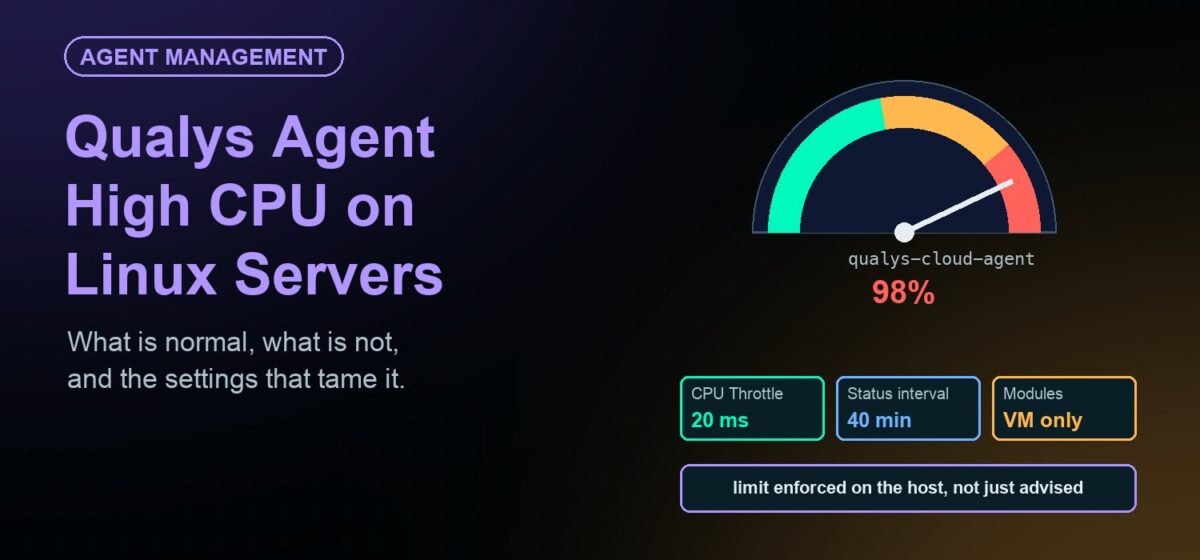
The agent’s resource use is governed by the configuration profile assigned to the host in the Qualys console, and the profile has a performance section. On Linux the relevant control is CPU Throttle: a delay, in milliseconds, inserted between the agent’s operations. Zero means no delay. Qualys documents a range of 0 to 1,000 and suggests roughly 20 for a low-impact profile, 10 for normal and 0 for high performance. A server that is spiking usually has a profile with the throttle at or near zero, often because someone chose “High” to get first results faster and never changed it back.
Two other profile settings matter. The agent status interval decides how often the agent checks in with the platform for new work, with a documented range from five minutes to a day; a short interval on a large fleet keeps agents busier than they need to be. The delta upload interval sets how often changes are sent. Longer intervals on both reduce background load at the cost of freshness.
3. Modules you did not plan for
Policy compliance scans evaluate hundreds of controls and can be heavy. File integrity monitoring watches paths continuously. The EDR module adds a process of its own. If a host that was fine for a year started spiking last month, check whether a module was activated for its tag.
4. Scans that collide with other work
A full assessment that lands during the backup, the batch job or the patch window stacks on top of it. The agent does not know about your maintenance calendar. Use tags and profiles so latency-sensitive servers carry a low-impact profile, and keep the heavier modules off hosts that cannot afford them.
5. An old agent
Qualys has shipped several performance changes to the Linux agent, including, in recent releases, a kernel-level CPU limit for the command execution pipeline on systemd hosts. An agent several versions behind does not have them. Agent version is worth checking before tuning anything.
6. Two agents
A server cloned from an image with the agent installed can end up with two identities or two processes competing. Look for more than one agent process before assuming one is misbehaving.
Measuring it properly
Before changing a profile, get a number. Watch the agent process over a full cycle, not the ten seconds after the complaint:
top -p $(pgrep -d, -f qualys-cloud-agent)/var/log/qualys/qualys-cloud-agent.logshows when scans started and finished, which lets you line up the spike with the activity.
What you want to know is whether the spike is the scheduled scan (tune the profile), a module (decide whether the host needs it), or constant (something is wrong, open a case).
Keeping it fleet-wide
The hard part is not tuning one host. It is that there are two thousand hosts, several profiles, tags that drifted, and no single view of which servers are carrying which load. Three practices help.
- One inventory of agent, version and profile per server. The server team needs to see what the Qualys team assigned, and the Qualys team needs to see what the server team is running.
- A limit the agent cannot exceed, enforced on the host. The profile throttle is advice the agent follows. A cap enforced from outside the agent is what lets an application owner accept the agent on a sensitive host.
- Never let “stopped temporarily” be the answer. A stopped agent means a host with no vulnerability data, which reads as clean. If an agent is stopped, it should be restarted and the stop should be logged, so the conversation is about the limit, not the gap.
How JetPatch Agent Manager handles it
The Qualys Cloud Agent is one of the agents JetPatch Agent Manager has a pre-built package for. As a managed agent, the load problem gets handled from the server side.
- Resource throttling per agent and per server. JetPatch monitors each managed agent’s CPU and memory and throttles it to the configured policy. There is also an aggregate limit per server: if all managed agents together exceed the CPU budget while competing with applications, they are limited equally; if they exceed the memory budget, the heaviest one is restarted, and after repeated restarts it is stopped. Every threshold crossing is logged.
- Watchdog. An agent an administrator stops is restarted and the stop is recorded, so coverage gaps are minutes long and visible.
- Inventory. Agent presence and version on every server, including agents JetPatch did not install, in one place next to the server’s patch status.
- Logs from the console. The agent log is viewable without a server login, which is how the Qualys team and the server team look at the same spike.
- Staged upgrades. New agent versions, including the ones that carry performance fixes, roll out by server group with a pilot first and a rollback path.
On the patch side, Qualys findings can be imported into JetPatch so that each vulnerability maps to the advisory that fixes it and the remediation plan that will apply it. The agent finds the problem; the patch cycle closes it; the same console shows both.
When to open a case with Qualys
Constant CPU with no scan in the log, a spike that survives a low-impact profile and a current agent version, or an agent that restarts itself repeatedly. Bring the log, the agent version and the profile settings, and the case moves faster.
Frequently asked questions
Is high CPU from the Qualys Cloud Agent normal?
For the first scan after install, yes: it is a full assessment and can use a core for some minutes. Ongoing spikes point to a performance profile with little or no throttle, modules such as policy compliance or FIM, an old agent version, or a scan colliding with other workloads.
Which setting limits Qualys Cloud Agent CPU on Linux?
CPU Throttle in the configuration profile’s performance settings. It adds a delay between agent operations; higher values mean less CPU and slower scans. Qualys documents 0 to 1,000 milliseconds, with about 20 suggested for a low-impact profile. The CPU Limit percentage applies to Windows agents.
Can I schedule when the Qualys agent scans?
Not with a clock in the way a scanner is scheduled. You control the intervals in the profile and which hosts get which profile and modules through tags. Keep latency-sensitive servers on a low-impact profile and keep heavy modules off hosts that cannot afford them.
What happens if an admin stops the agent to reclaim CPU?
The host stops reporting and shows as having no vulnerabilities, which reads as clean. An agent manager restarts the agent and logs the stop, and enforces a CPU limit from outside the agent so the stop is not needed.
Does JetPatch replace the Qualys console?
No. Qualys still runs the assessment and holds the findings. JetPatch keeps the agent deployed, running, throttled and current, and can import Qualys findings to drive the patch cycle that fixes them.