A Linux server that stops reporting to the Falcon console is one of the most common tickets an EDR team raises with the server team, and one of the least informative. “Last seen three days ago” could mean the sensor is stopped, the kernel outgrew it, the proxy changed, or the host was cloned from an image that still had a sensor ID baked in. The fix is different in each case, and on a fleet of a few thousand servers you will have several of them at once.
This is the checklist we use. The first half is per-host diagnosis, in the order that finds the cause fastest. The second half is about doing it across the whole estate instead of one SSH session at a time.
First, know which kind of silent you have
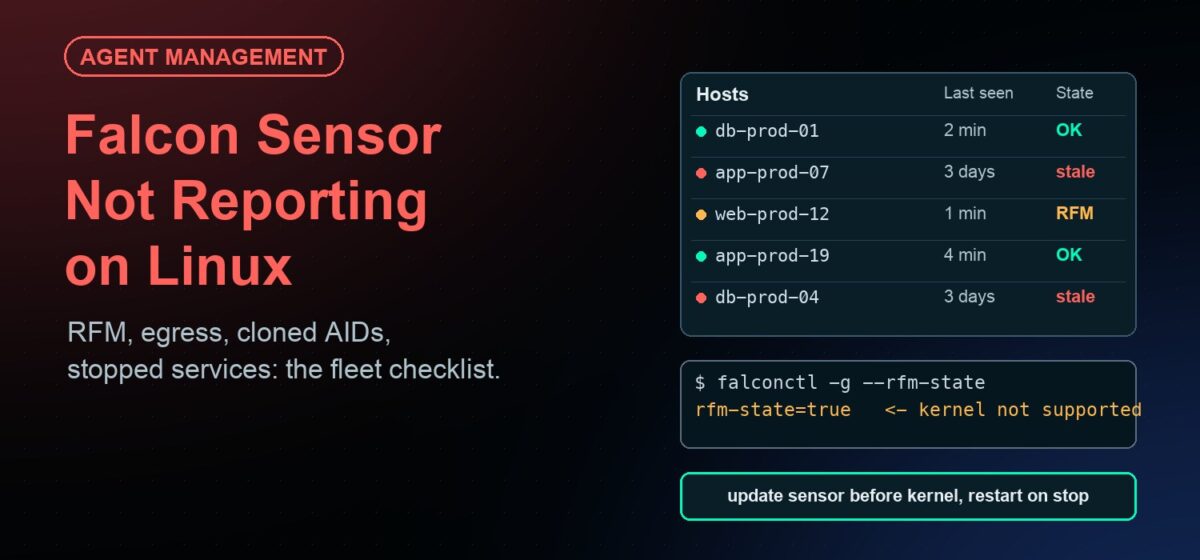
The Falcon console shows two different problems as one. A host whose sensor is stopped or cannot reach the cloud goes stale: its last-seen time stops moving. A host in Reduced Functionality Mode (RFM) looks fine in the host list, because the sensor still sends heartbeats, but it is not inspecting anything. Only the RFM filter or the host details page shows it.
So before touching a server, pull two lists from the console: hosts not seen in the last 24 hours, and hosts in RFM. They need different fixes, and the RFM list is usually the bigger one the week after a kernel update.
Per-host checks, in order
1. Is the service running?
systemctl status falcon-sensorjournalctl -u falcon-sensor --since "2 days ago"
If it is stopped, the journal usually says why: an install that never completed, the OOM killer, or an administrator who stopped it to get CPU back for an application and forgot. The last one is more common than anyone admits, and it is the reason a watchdog matters more than any single fix below.
2. Is the kernel supported?
/opt/CrowdStrike/falconctl -g --rfm-state/opt/CrowdStrike/falconctl -g --rfm-reasonuname -rand/opt/CrowdStrike/falcon-kernel-check
RFM on Linux almost always means the running kernel is newer than the installed sensor supports. It appears the first time a host boots after a routine kernel package update, which is why it tends to arrive in batches right after a patch cycle. The sensor keeps heartbeating, so nothing alerts.
The fix is one of two things: update the sensor to a version that supports the kernel, or boot a kernel the sensor supports. The prevention is sequencing: in the patch plan, update the sensor before the kernel, and hold kernel packages on hosts where the sensor does not yet support the new version. Secure Boot hosts have a second RFM cause: if CrowdStrike’s signing key is not enrolled in the machine owner key list, the kernel refuses the module.
3. Can it reach the cloud?
/opt/CrowdStrike/falconctl -g --aph --appshows the proxy the sensor thinks it should use.- Confirm outbound 443 to the CrowdStrike endpoints for your region from this host, not from your laptop.
Proxy changes, new egress firewall rules and a subnet that was never allowed out are the usual causes. A sensor that cannot reach the cloud stays installed, stays running, and stays silent.
4. Is it registered to the right customer?
/opt/CrowdStrike/falconctl -g --cid/opt/CrowdStrike/falconctl -g --aid
A wrong or mistyped customer ID at install time means the host registers nowhere, or in the wrong tenant. If the AID is empty, the sensor has never completed registration.
5. Is the host a clone?
Servers built from a template or snapshot that already had a sensor installed come up with the same agent ID. The console treats them as one host that keeps changing hostname. The symptom is a server that appears, disappears, and reappears while a sibling does the opposite.
The fix is to clear the AID before the image is captured, with falconctl -d -f --aid, or to reinstall the sensor on the affected clones. The prevention is to install the sensor at first boot, by policy, rather than in the image.
6. Is the sensor version allowed?
/opt/CrowdStrike/falconctl -g --version against your sensor update policy. Hosts that fell behind the allowed versions, often because they were off for a while, may be excluded or stuck.
Doing this across the fleet
One host at a time is fine for a tenant with fifty servers. It is not fine for two thousand, and it is not fine the week after a kernel update when the RFM list has three hundred entries. Three things make the difference.
- A list of where the sensor should be. Every incident starts with the same question: which servers are missing from the console entirely? That needs an inventory from the server side, not from the EDR side, because a server that never registered is invisible to the console.
- The checks as a job, not a procedure. Service state, RFM state, kernel version, sensor version and AID can be collected from every host in one pass and compared to the console’s host list. The hosts that need a human are the exceptions.
- A restart that happens without a ticket. Most stopped sensors need nothing more than a start. If that happens automatically within minutes and is logged, the coverage gap is minutes, not the time to the next review.
How JetPatch Agent Manager handles it
The CrowdStrike Falcon sensor is one of the agents JetPatch Agent Manager has a pre-built package for. Running it as a managed agent changes the shape of the problem above.
- Deployment by policy, including the CID. The sensor is deployed to every server that matches a policy, with the customer ID in the package, so a new server gets a correctly registered sensor at first boot rather than one baked into an image.
- Watchdog. If the falcon-sensor service stops, JetPatch restarts it and logs the event. An administrator who stops the sensor to reclaim CPU finds it running again, and the log shows who stopped it and when.
- Custom health tests. A health test that runs the RFM state check can be deployed alongside the sensor, so a host in RFM shows as unhealthy in the JetPatch console instead of healthy in the Falcon console.
- Logs without SSH. The sensor’s files and logs are viewable from the console, so the EDR team can diagnose a host without a server login.
- Software Discovery. Servers that have a sensor installed outside JetPatch, or no sensor at all, appear in the same inventory as the managed ones. That is the “where should it be” list.
- Sequencing with patching. Because JetPatch also runs the kernel updates, the remediation plan can carry a pre-patching task that checks sensor support for the incoming kernel. If the task fails on a host, that host is skipped for the cycle instead of booting into RFM.
Throttling is part of the same package: CPU and memory limits per managed agent, so the sensor cannot be the reason an owner disables it.
When it is not the sensor
Two things look like a sensor problem and are not. A host that was decommissioned but never removed from the console will stay stale forever; the fix is hygiene in the console, not on the server. And a host whose time is badly wrong can fail TLS to the cloud; check NTP before reinstalling anything.
Frequently asked questions
Why does the Falcon console show a host as online when it is in RFM?
Because the sensor keeps sending heartbeats in Reduced Functionality Mode. It is installed and running, but not inspecting the kernel. Use the RFM filter in the host list or run falconctl -g --rfm-state on the host to see it.
What causes RFM on Linux after a kernel update?
The new kernel is not yet supported by the installed sensor version. Either update the sensor to a version that supports the kernel, or boot a supported kernel. Sequence sensor updates before kernel updates in your patch plan to avoid it.
Why do cloned servers keep replacing each other in the console?
They share an agent ID because the sensor was installed in the image. Clear the AID before capturing the image with falconctl -d -f --aid, or reinstall the sensor on the clones.
Can an agent manager stop someone from disabling the sensor?
Not an administrator with root. What it does is restart the sensor within minutes and record the stop, so the gap is short and visible rather than discovered at the next coverage review.
Does JetPatch replace the Falcon console?
No. Detection and response stay in Falcon. JetPatch deploys, monitors, restarts, throttles and upgrades the sensor, and gives the server team the inventory and logs they need to keep it reporting.